|
Dear TJHSST Families,
We can't wait to welcome your students back for the first day of school on Monday! We have spent the past week making sure everything is in place and are excited for a strong opening week.
This week's newsletter brings to your attention several items that are key to making sure the beginning of the year goes smoothly for your child, including:
- Information on Student Schedules
- Permission Forms
- Arrival and Dismissal Procedures
- Medicine and Health Policy information
Please be sure to read through the entire newsletter.
If you ever have questions or aren't sure who to reach out to, please feel free to contact our Director of Communications, Mike Roth. He will gladly assist you or connect you with the right person.
Warm regards,
The TJHSST Team
The best source for information as we start the 2026-27 school year is always the TJHSST website. Here are some important pages to view.
2026-27 Back to School Webpage - All the information in one place!
2026-27 Anchor/Red/Blue Calendar
2026-27 Bell Schedules
Subschool Directory
For opening day, August 24, we will run a modified Anchor Day schedule with an extended advisory and no JLC. Students get to know their advisory teacher and receive laptops. Here is the schedule for Monday, August 24.
| Modified Anchor Day with Extended Advisory |
| Period |
Start Time |
End Time |
| Advisory |
8:40 a.m. |
9:40 a.m. |
| 1st Period |
9:50 a.m. |
10:30 a.m. |
| 2nd Period |
10:40 a.m. |
11:20 a.m. |
| 3rd Period |
11:30 a.m. |
12:10 p.m. |
| Lunch |
12:15 p.m. |
12:45 p.m. |
| 4th Period |
12:50 p.m. |
1:30 p.m. |
| 5th Period |
1:40 p.m. |
2:20 p.m. |
| 6th Period |
2:30 p.m. |
3:10 p.m. |
| 7th Period |
3:20 p.m. |
4:00 p.m. |
Student schedules for the 2026-2027 school year are now available to view on StudentVUE and ParentVUE. New students can find their counselor assignments under the "Student Information" tab.
Please review the schedule carefully for accuracy.
Need to make a change? Your counselor will be available to assist if you notice one of the following errors right away.
- A required graduation class is missing.
- A summer school class is still appearing on the schedule.
- Your student is in the wrong level of a course (like math or a world language).
When emailing your counselor, please include your student's ID number, a clear description of the problem, and your suggested solution.
Elective Courses: If your desired elective isn’t on the schedule, it means that it was not possible for the class to fit into the schedule. Your student was automatically enrolled in an alternate choice from their list. During the second week of school only, students have an opportunity to request changes in accordance with the TJHSST Schedule Change Policy.
Directions for the First Day of School: Students will first report to advisory listed as period 10 on the schedule and then report to periods 1-7. A paper copy of the schedule which shows all year, semester 1, and semester 2 courses will be distributed in advisory. We encourage students to share this schedule with parents, as the semester 2 courses are not visible in StudentVUE until January.
Families can easily grant permission for their children to access a variety of school resources through the Parent Digital Consent system. Opt your child in or out of online educational tools and choose how student information is managed. Visit FCPS’ Parent Digital Consent webpage to access the system.
As the new school year approaches, parents/guardians will want to check their student's emergency information online and make changes if necessary. With FCPS that is done via the Online Verification Packet (OVU).
The OVU is found in your ParentVUE account. It will allow parents/guardians to review and update phone numbers, emergency contacts and health information (such as health conditions and immunizations) for students in grades PS/HS and kindergarten through 12th grade.
Enrolling parents will be able to access OVU through their SIS ParentVUE account. If you need help with the Online Verification/Update packet or for technical support, create a Parent Support Request ticket for support with the application (select Online Registration in the Application dropdown menu) or call the Parent Technology Help Desk at 833-921-3277 (833-921-FCPS).
Visit TJ's Back-to-School Website for a link to step-by-step instructions on how to access and fill out the OVU.
IMPORTANT NOTE: Only the ENROLLING PARENT will be able to access the OVU. If you are not the enrolling parent, you will receive an error message.
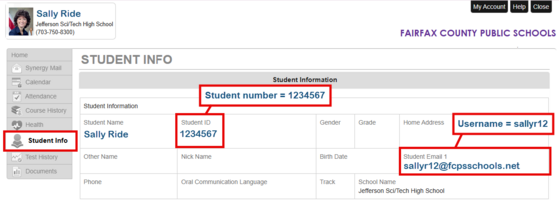
Families can help their students be ready on Day 1 by ensuring the student knows both their Username and their Student ID. These can be found in the Student Info tab on ParentVUE. Students previously enrolled in FCPS will have the same data for both, but new-to-FCPS students will see distinct Username and Student ID information. Please refer to the example above for clarification.
Here are arrival procedures for the 2026-27 school year.
Arrival Times & Entry
-
Weapons Screening: All students must pass through weapons screening upon entry.
-
Hours: Doors 8 and 12 open at 8:10 AM; the school day begins at 8:40 AM. (Door 1 is reserved for late arrivals only).
-
Target Arrival: Arrive no later than 8:15 AM to avoid heavy traffic backups on Braddock Road.
Drop-Off Instructions (Kiss & Ride)
-
Location: Behind the school. Enter off Braddock Road and follow signs to the left.
-
Unloading: Pull up all the way to Door 9 before letting your child out.
-
Entry Route: Students walk from Door 9 to Door 8 or 12 to complete weapons screening and enter.
Student Driving & Parking
-
Assigned Parking: New this year - Juniors and seniors who have purchased parking passes will receive assigned numbered spots.
-
For Monday and Tuesday (Aug. 24-25): Drivers may park in any numbered spot, but must pick up their parking pass during lunch in Room 130 (near Door 12).
-
Effective Wednesday, Aug. 26: Students must display their pass and park exclusively in their assigned spot.
-
Entry Route: Once parked, head to Door 8 or 12 for weapons screening.
Visitor Procedures
-
Check-In: All visitors must enter through the Dome (Door 1) using the camera/buzzer system and sign in at the Main Office.
-
Campus Security: School Resource Officer Benji Main will be on site regularly, with his vehicle parked at the front of the school.
Here are dismissal procedures for the 2026-27 school year.
Driving & Traffic Rules
-
Campus Entry: Enter from Braddock Rd. and turn left immediately onto campus. Follow all staff directions and signs to line up, park, and exit.
-
Speed Limit: Maintain a maximum speed of 15 MPH on school grounds.
-
Traffic Safety: Obey all posted traffic signs, crosswalks, and stop signs around the building.
Student Pick-Up Zone
-
Exit Doors: Students exit through Doors 7, 8, and 9.
-
Pick-Up Location: All student pick-ups must take place in the back parking lot only.
Parking Options (Arrive Before 3:55 PM)
-
Rear Parking Area: Located past the yellow speed bump at Door 7 up to Door 9.
-
Minor Lane: Located along the driveway between the athletic fields, including the football stadium area.
-
Prohibited Parking: Do not park in the visitor lot, staff parking, or the bus depot.
-
No Neighborhood Parking: Parking on surrounding neighborhood streets is strictly prohibited (private property). Violators risk receiving a police ticket.
Dismissal Schedule & Bus Blockade
-
4:00 – 4:10 PM: Dedicated 10-minute window to pick up your child and exit campus.
-
4:10 PM (Bus Departure): Buses depart at approximately 4:10 PM. All car traffic stops and must wait until all buses completely exit campus before vehicle traffic resumes.
If you are dropping off or picking up your student while school is in session (8:40 a.m. to 4:00 p.m.) here is our official policy:
- There should be no student drop off or parking along the front of the building. This is a fire lane.
- Students need to be dropped off in the visitor lot using the cross walk and enter door 1.
- There should not be any “U” turns in front of the building.
- Do not drive your car up onto the front sidewalk and park there (yes, that has been an issue in the past!).
-
Device Requirement: Starting this school year, students may only use FCPS-issued devices for school-related digital activities during the instructional day. This is in accordance with a new School Board requirement, approved on July 16, which states that students may not use personal electronic communication or computing devices, including personal laptops, tablets, smartwatches, smartphones, and similar devices.
-
Exceptions: Students may only use a personal device if it is required as part of a necessary accommodation in the student's Individualized Education Program (IEP) or Section 504 Plan. A principal or the principal’s designee may approve a limited, course-specific exception for students enrolled in a specialized class when the curriculum requires a technology tool or software that isn’t available on a standard FCPS-issued device.
-
Distribution Details: Chromebooks will be distributed to students during the Advisory period in the first week of school. Student passwords can be created/reset at that time.
-
Preassigned Devices: Chromebooks are preassigned at TJ. Students will receive an email notice to their fcpsschools.net account when their FCPSOn laptops are assigned and checked out in the system
-
Devices Needing Repair: Students who have a device that needs to be repaired should stop by the tech office (room 281) with their device.
-
Dell to Chromebook Swaps: If you have a Dell laptop and would like to swap to a Chromebook, back up your files and email TJHSSTTechTeam@fcps.edu to share your interest. Upon receiving an email saying your Chromebook is ready, please stop by the tech office (room 281) to make the swap.
-
New Students Who Still Have Old Device: If you are new to TJ and still have your device from your previous middle/high school, please turn it in to our tech team. We will swap it out with one of our devices and return it to the school that it belongs to.
This fall, every FCPS student will receive a student identification (ID) card as part of a divisionwide effort to modernize school transportation, improve communication with families, and strengthen student safety while traveling to and from school.
Every student who rides the school bus will need to tap on and tap off the bus every day using their new student ID card. Families can help by reinforcing this new habit with their child.
All students at our school will need to wear their student ID cards throughout the school day. We will be handing out the new student ID cards the first few weeks of school. More details will be shared soon.
Learn more about the new transportation system and student ID cards.
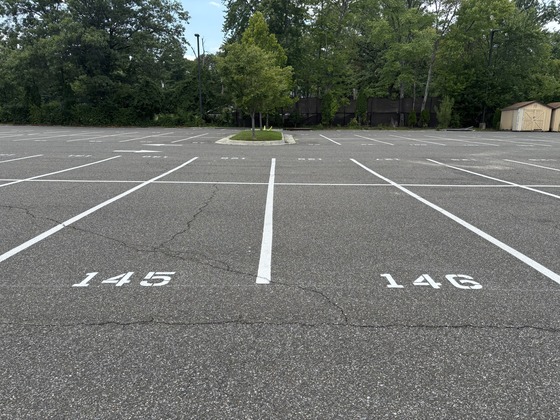
Students who have purchased parking passes must pick them up either Monday, Tuesday or Wednesday, Aug. 24-26 in Room 130 during lunch.
Please note that student parking procedures have changed for the 2026-27 school year.
Students who purchase a parking pass will be assigned a specific parking spot. For the first 3 days of school please park in any numbered spot (no staff spots) between doors 7 and 9. Starting Thursday, August 27th, all students must park in their assigned spot. Violators will be ticketed.
For any questions or assistance, please contact Associate Principal Betsy Fawsett.
If students are still interested in purchasing a parking pass, please fill out the Parking Pass Form.
As the school year commences, we are pleased to offer two Back-to-School Night options this year:
-
Virtual Option (Recommended): Hosted entirely on Schoology, this flexible format allows you to view pre-recorded videos from each of your child’s teachers at your convenience. Videos will introduce the teacher, outline course expectations, explain how to support your student, and provide contact information. All videos will be available by the start of the second week of school.
-
In-Person Session: Held on Wednesday, September 9, from 6:00 to 8:00 p.m. Parents will follow their student’s Period 1–7 schedule, spending 10 minutes in each classroom to hear directly from teachers.
Please Note on Parking: Due to strictly limited on-site parking on September 9 (available on a first-come, first-served basis), we strongly encourage parents to utilize the virtual option if possible.
Additional details, including the specific bell schedule for the in-person event and direct links to the virtual content, will be emailed closer to the date.
If your student will need to take any medication at school next year—prescription or over-the-counter (OTC)—a completed Medication Authorization Form is required.
You can get the forms:
A signed form is still required even if your child carries their emergency medication (like an inhaler or epinephrine).
For students to self-carry or store medications in the health room, FCPS requires updated medication authorizations each school year. I am providing links to the most recent versions of the authorizations for your convenience. Please print the document(s) that are appropriate for your student and share with your health care provider.
*Please note: The appropriate authorization should be on file even if your student self-carries an inhaler or epinephrine.*
Asthma/Inhaler:
The Virginia Asthma Action Plan is required for any inhalers (even if self-carried).
Once your health care provider has completed the Virginia Asthma Action Plan, you will need to complete the FCPS Authorization for VA Asthma Action Plan (SS/SE-65) authorizing the principal designee/SHA/PHN/school staff to administer the asthma medication to your student.
Anaphylaxis/Epinephrine:
Please have your health care provider complete the FCPS Authorization for Anaphylaxis Action Plan if your student will be self-carrying or leaving epinephrine in the health room.
Other medications:
Please have your health care provider complete the Medication Authorization (SE63) for all other prescription medications (not epinephrine or inhaler) or over the counter medications like Benadryl.
Over the counter (OTC) medications must be new/unopened and in their original containers. No healthcare provider's signature is needed for OTC medications used for headache, muscle aches, orthodontic pain, or menstrual cramps. If you are providing an OTC medication for any other reason or if the dosing is outside of the manufacturer’s recommendations, a healthcare provider's signature is required.
Prescription medications must be in a properly labeled container and the label should match the dosing and frequency information on the Medication Authorization.
Should you have any additional questions or concerns, please feel free to contact me (LWilkes@fcps.edu).
Thank you for your collaboration in keeping your student safe and healthy!
|