|
It was fantastic seeing so many families at our Spartan Spree yesterday as we prepare to kick off the 2026-2027 school year this Monday, August 24th! We are looking forward to a great year and are excited to welcome all of our students to WSHS! Monday is an “Orange Day” (periods 1,3,5,7). Staff will be stationed throughout the halls to help anyone who needs assistance finding their first-period class. Please review your schedule in StudentVue on Sunday evening, as adjustments are still being made.
Our arrival and dismissal procedures have changed and were emailed yesterday and are listed below. Doors open to students at 7:30 AM. Students must enter through Door #1 or Door #5 during morning arrival. Door #10 is no longer an entry point due to updated traffic patterns. Thank you for your partnership and for helping us make this transition successful so that everyone stays safe as they travel to and from school.
I also wanted to highlight a change to FCPS’ cell phone policy. Across all grade levels, cellphones, cellphone accessories, and all smart devices must be off and personally stored for the duration of the school day (bell-to-bell). Watches that serve a dual purpose (like a smartwatch) must be off and personally stored for the duration of the school day, too. The biggest change for high school students is that students are no longer permitted to use their cellphones during lunch. We understand that this is an adjustment, and we appreciate your support as we implement this new policy.
While new beginnings bring excitement and a few nerve-wracking moments, our entire team is ready to guide our students through a great first week.
Thanks,
Jim Patrick
Principal
West Springfield High School
August 24: 1st Day of School
September 4-7: Labor Day Holiday
September 8 : Back to School Night
We want to share an important change to our morning arrival and afternoon dismissal procedures. We no longer have a crossing guard to help direct and control traffic, so we are adjusting the traffic patterns for our buses and kiss and ride lanes. These changes will keep everyone safe and keep traffic moving smoothly.
The following diagram shows the new traffic pattern for Kiss and Ride and buses. Details about the new traffic patterns during morning arrival and afternoon dismissal are after the diagram.
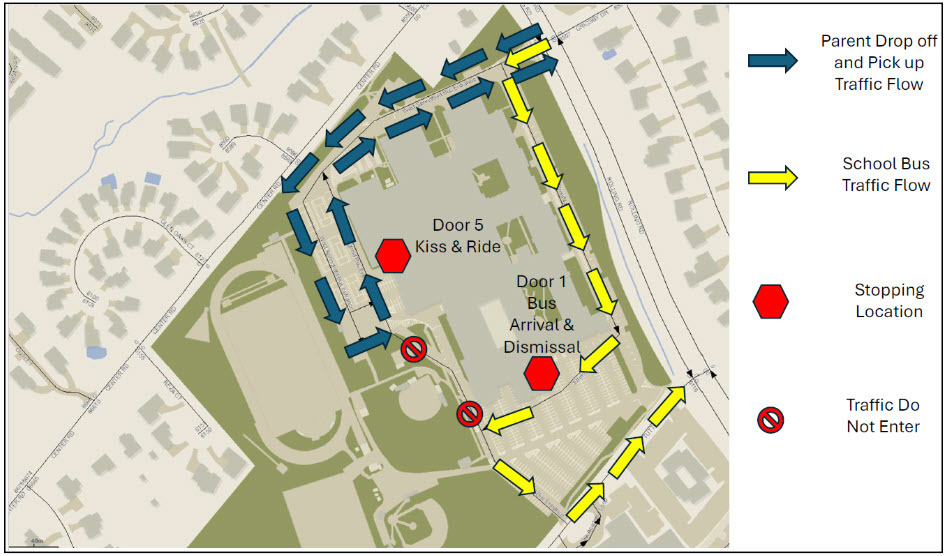 Alt Text: Diagram of West Springfield High School that shows buses and parents entering the school from Grigsby Road. Buses proceed to Door 1 to drop-off and pick-up students before exiting via Tuttle Road to Rolling Road. Kiss and Ride proceed to Door 5 for pick-up and drop-off before exiting via Grigsby Road to Rolling Road.
Morning Arrival Changes
- Buses and parents will continue to enter from Grigsby Road off Rolling Road.
-
Buses will proceed to Door #1 to drop off students and then exit via Tuttle Road to Rolling Road.
-
Kiss and Ride vehicles will proceed to Door #5 to drop off students and then return the same way to Rolling Road at the Grigsby Road intersection. All vehicles must turn right onto Rolling Road. No left turns will be permitted.
- At approximately 8:10 a.m., after the buses have departed, families will be directed to Door #1 for student drop-off.
Afternoon Dismissal Changes
- Buses and parents will continue to enter from Grigsby Road off Rolling Road.
- Buses will proceed to Door #1 to pick-up students and then exit via Tuttle Road to Rolling Road.
-
Kiss and Ride vehicles will proceed to Door #5 to pick-up students and then return the same way to Rolling Road at the Grigsby Road intersection. All vehicles must turn right onto Rolling Road. No left turns will be permitted.
- Please follow staff directions and the designated traffic pattern.
We all encourage that all walkers cross Rolling Road at the traffic light at Tuttle Road and Rolling Road, where there is a designated crosswalk. Students should not cross Rolling Road at Grigsby Road, as there will no longer be a crossing guard at this intersection. If your child walks to schools and crosses Rolling Road, please speak with them about where they should cross in order to keep them safe.
We know a new routine can take a little time to get used to, and we greatly appreciate your patience and cooperation. Our team will do our best to help families navigate these changes on Monday and will put out signs and cones to help direct the flow of traffic.
Counselor Assignments: Please see the counselor breakdown below to identify your student’s assigned counselor.
Sub School 1 – Temporary Counselor Coverage While our Sub School 1 counselors are on leave, students in Sub School 1 will be temporarily supported by counselors from our other sub schools based on grade level:
-
Grade 9: Ms. Lodwig & Mr. Duperrouzel
-
Grade 10: Mr. Montero & Ms. Fleming
-
Grade 11: Ms. Neforos & Ms. Fulton
-
Grade 12: Ms. Arenholz & Mr. Tsang
Counselors providing temporary Sub School 1 coverage will continue to serve their regularly assigned students as well.
Regular Counselor Assignments
-
A–BIE: Ms. Frisch (Sub School 1, temporary leave)
-
BIF–DAH: Ms. Montain (Sub School 1, temporary leave)
-
DAI–GAB: Mr. Montero (Sub School 2)
-
GAC–HOW: Ms. Fleming (Sub School 2)
-
HOX–LED: Ms. Arenholz (Sub School 3)
-
LEE–MOD: Mr. Tsang (Sub School 3)
-
MOE–PIN: Ms. Fulton (Sub School 4)
-
PIO–SEC: Ms. Neforos (Sub School 4)
-
SED–TOO: Ms. Lodwig (Sub School 5)
-
TOP–Z: Mr. Duperrouzel (Sub School 5)
 |
|
The graduation ceremony for the Class of 2027 will be held at Eagle Bank Arena on Tuesday June 8, 2027 at 7:00 PM. |
At West Springfield High School, we acknowledge that parents are our students' first and most important teachers. Parents now have greater control over their child’s FCPS-issued device outside of school hours through Lightspeed Parent Portal.
In addition to monitoring weekly internet activity, parents can now also customize web access at home on FCPS devices through Lightspeed using Schedules and Web Rules.
With Schedules, you can set tailored times to automatically pause or restrict internet access. This makes it easier to enforce rules around homework time, family dinners, weekends, or bedtime.
In Web Rules, you can create Custom Block Lists to block specific, individual websites they do not want your child accessing at home. This allows parents greater control over what is happening online, under their own roof.
These new custom controls take effect at home, outside of school hours, and when the device is off the FCPS network. They will not override standard district filtering policies during the instructional day.
Customize Your Lightspeed Settings
All parents should be receiving weekly Lightspeed Online Student Activity Report emails. To set up these new features, click the “Log in or Register” button at the bottom of your weekly Lightspeed Online Student Activity Report email.
Visit the FCPS Lightspeed Parent Portal Guide for more information. If you have additional questions, submit a Parent Technology Support Ticket.
Parents are encouraged to discuss internet boundaries with their children so that they can understand the reasoning behind any limits and the differences between access at home and at school. Get tips on talking to your children about technology safety.
Teachers use Schoology to post their classroom materials online; to provide a secure forum for students to discuss their ideas and collaborate on projects; and to assign and collect homework electronically. It helps students stay organized, and it keeps the class connected.
A Schoology Parent Account gives you access to:
- Your child’s classes.
- Your child’s upcoming assignments.
- School, class, and group announcements.
To access Schoology, parents will need to have an active SIS/ParentVUE account. Get more information on how to login and use Schoology.
The Spring Social and Emotional Learning (SEL) Screener will be administered to students in grades 3 through 12 in October. Students use the SEL Screener twice a year to share their perspectives on how well their school and community help them develop skills they need to succeed. The screener works by asking questions or presenting statements that students can think about and respond to. This gives students a way to share how well their school community makes them feel valued, included, and supported.
After each screening, results are available in the Documents tab of SIS ParentVUE and mailed to families without a ParentVUE account. For more information, including SEL Screener questions and opt-out information, please visit the Social-Emotional Learning (SEL) Screener webpage.
English | Español | አማርኛ | 中文 | 한국어 | Tiếng Việt | العربية | فارسی | اردو
|