A Mssage from Principal Steven McFarlane
Kilmer Community,
It was great to see so many students and families at our Open House yesterday! We’re excited to welcome students on the first day of school on Monday. To help students and families familiarize themselves with the procedures and expectations, I’ve structured this newsletter with two main sections. After the calendar and a few pictures, you’ll see First Day of School - August 24 and Important Information.
Under First Day of School - August 24, each section is in chronological order and helps families and students know what to expect from the beginning to the end of the first day. It may be helpful to sit with your student and review this section before Monday. Rest assured that it’s an all-hands-on-deck approach for the adults in the building. We’ll be visible and ready to help students learn how to navigate Kilmer on the first day and for the first few weeks of school.
The final section, Important Information, has a lot of information that pertains to the first few weeks of school, and is a good resource to refer back to if needed.
Sincerely,
Steven McFarlane
Principal
|
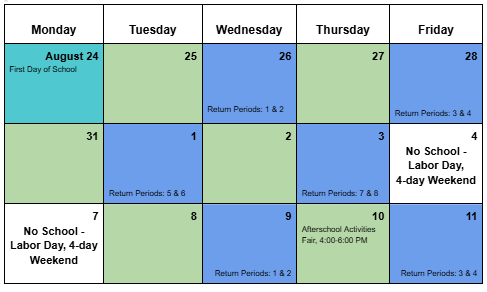 |
 Upcoming Dates:
-
August 24 - First Day of School
-
September 4 - September 7 - Labor Day, 4-day weekend
-
September 10 - Afterschool Activities Fair
-
September 17 - Save the Date! Back-to-School Night at Kilmer MS; more details to come.
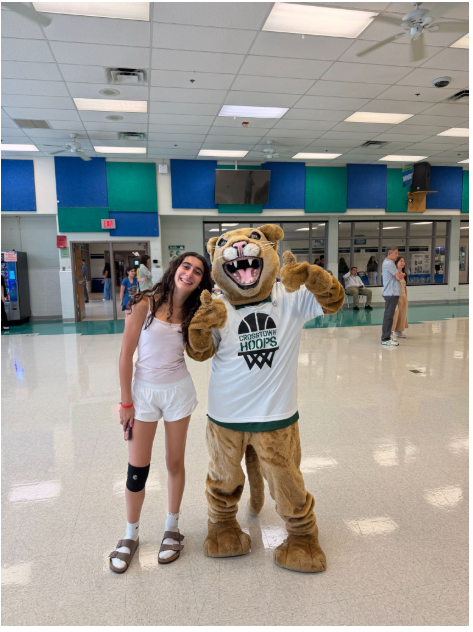
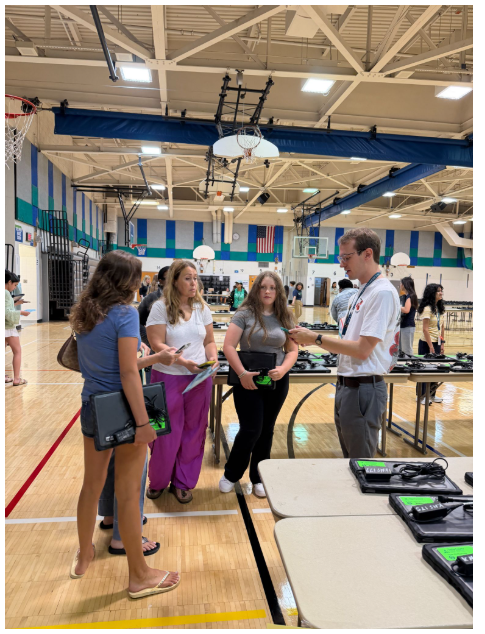
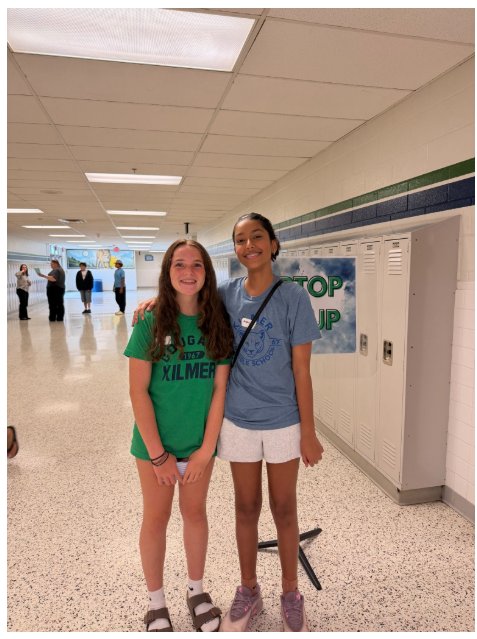
Kilmer students and families started off the year strong by attending our Kilmer Open House on Thursday. This was an opportunity for students to visit their classrooms, meet their teachers, and hang out with KC the Cougar!
Getting to School
Buses - ID cards - Stops/times
New student ID cards support school transportation, improve communication with families, and enhance student safety. Students who ride a school bus will tap on and tap off the bus every day using their new student ID card. Students will receive their ID card during the first week of school.
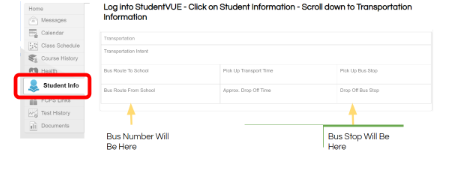
Student bus information is available in SIS StudentVue. FCPS Transportation coordinates all information regarding bus routes, stops, and rider status. Kilmer MS cannot make exceptions to routes or stops, and we cannot provide bus passes for students to temporarily ride another bus.
If you have questions about your student’s bus information or need to inquire about exceptions such as dual custody, please contact FCPS Transportation at:
Buses: Bus stops, times, and route numbers are available on SIS StudentVue or ParentVue. Sign in, then go to Student Info, and scroll down to view bus information.
Kiss & Ride
-
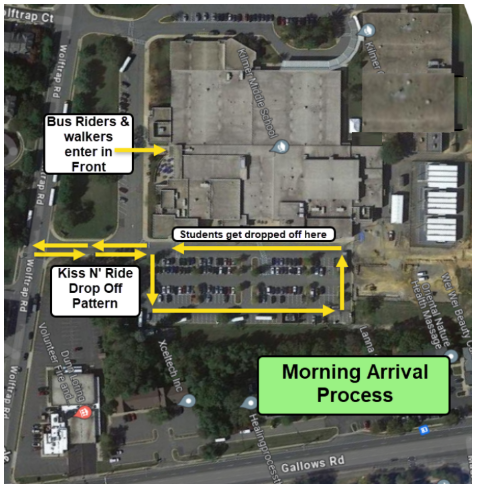
Kiss & Ride, Walkers, and Bike riders: Students may enter the building beginning at 7:10 am. See the map below for the Morning Arrival Drop-off traffic pattern and entrances for walkers and bike riders:
-
Kiss N’ Ride: Cars will be directed to pull all the way up along the side of the building. Students may unload along the side of the building and enter through Door 15. Students should not be dropped off in the parking lot.
-
Buses unload in the front building; students enter through Door 1.
- All students must use the sidewalks and crosswalks at all times. Bike riders MUST walk their bikes once they arrive on campus.
-
ONLY school buses will be allowed to use the bus loop in the front of the school from 7:00 to 7:30 am.
- Please do not drop your students off in the fire station lot or make a U-turn on Wolftrap Road. We have seen many frequent close calls and several citations by FCPD have been written. To avoid accidents or tickets, use the Kiss & Ride lanes.
Arrival
Open Gate
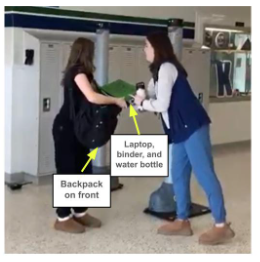
Open Gate is a weapons detection system that all FCPS middle and high schools use. All students will pass through an Open Gate station every day as they enter the building. Late arrivals will use the station in the main office. Students must remove metal items from their backpack, form a stack with these items, and then place their backpack on their front. Students will hand their stack of metal materials to the staff member at the Open Gate station before walking through. Items that may set off Open Gate include: 3-ring binders, laptops, umbrellas, metal water bottles, instruments, utensils, etc. See below for an example of a student walking through Open Gate.
Arrival Procedures
Once students go through Open Gate, they will go to one of two areas, the gym or cafeteria. When they arrive in the gym or cafeteria they will sit down until they are dismissed to class. Breakfast is available for purchase and can be eaten in the cafeteria. Food and drinks (except for water bottles) are not allowed in the gym. There is no assigned seating, and students can sit with whomever they choose.
Once The Bell Rings — Go To 1st Period
Bell Schedule
Kilmer has three bell schedules: Anchor, Green, and Blue. For your reference, the bell schedule is linked to our website HERE. On Friday afternoons, the weekly newsletter goes out and has a calendar identifying the type of schedule (Anchor, Green, or Blue) for the coming weeks.
Class Schedules
Students can view their class schedules through SIS StudentVUE . StudentVUE can be accessed on students’ FCPS laptops or through the SIS StudentVUE mobile app. Class schedules will also be visible for parents in SIS ParentVUE. All students will receive a paper copy of their schedules in 1st period on the first day of school. Kilmer staff and faculty will have access to all students schedules if any student doesn’t know what their 1st period class is.
Cellphones
Cell phones and all smart devices must be off and personally stored in a student’s assigned cell phone pouch from 7:30 AM–2:15 PM. Smart devices include smartwatches, earbuds/headsets, smart glasses, and other internet-connected devices.
The “off and away” policy begins on the first day of school. On Wednesday, August 26, students will receive their assigned pouch and learn and practice the daily routine, including locating release magnet stations for dismissal. Students without a cell phone or with an approved medical accommodation may return their pouch; administrators will follow up with families to confirm. If a student’s cell phone status changes during the year, families should contact their child’s administrator.
Students with accommodations that require access to a cell phone or personally owned device will continue to have access.
Daily Cell Phone Pouch Routine
-
By 7:30 AM: Students turn off their devices, lock them in their assigned pouch, and store the pouch in their backpack.
-
1st or 2nd period: The teacher checks that each student has secured their phone in their assigned pouch.
-
At 2:15 PM: Students unlock their pouch at a release magnet station, remove their device, and return the empty pouch to their backpack.
-
Late arrival/early dismissal: Students secure or release their cell phone pouches in the front office.
-
Forgotten pouch: During arrival, students report to the Forgotten Pouch station in main hall next to the Cafeteria and complete a form. Staff will collect the phone and bring it to the front office, where it will remain locked until the student picks it up at dismissal.
Laptops - FCPS Update: Student Use of Personal Laptops/Computers
This summer, the FCPS School Board approved a new regulation regarding student use of personal laptops or computers:
“During the instructional day, students may not use personal electronic communication or computing devices. Personal devices include, but are not limited to:
- Personal laptops
- Personal tablets
- Smartphones
- Smartwatches
- Other personal electronic communication or computing devices
Students must use FCPS-issued devices for school-related digital activities during the instructional day.”
At Kilmer, students will receive their FCPS-issued laptops at Open House on August 20 or during the first week of school.
Recess
Recess
Each day, students have 15 minutes of indoor recess or outdoor recess (weather permitting). During recess, students may play field games, basketball, talk with peers, read books, play board games, or have a snack. During the first week of school, we will spend recess time learning about activity choices and how to safely transition to and from recess.
Lunches
Lunches
A new online school menu platform that makes it easier to view daily menus, nutrition information, and allergens.
Lunch Schedule
Here is the link for the bell schedule: https://kilmerms.fcps.edu/bell-schedule. Teachers will review lunch procedures, times, and expectations the first few days of school (for Anchor, Green, and Blue day schedules).
Dismissal
Afternoon Dismissal:
-
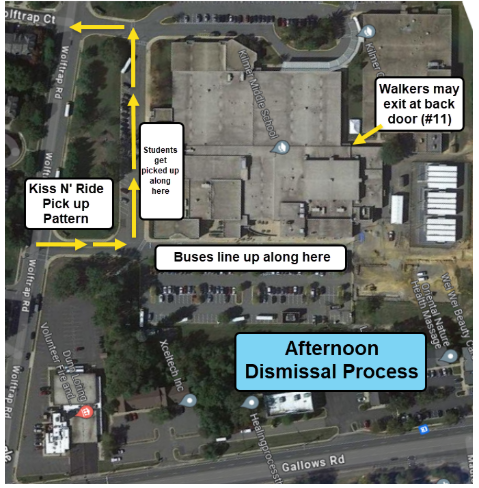
Buses: Buses load along the side of the building. During their last class of the day, teachers will post the order of bus numbers so students can locate their bus along the side of the building prior to dismissal.
-
Walkers and bike riders will leave via Door 1 or Door 11. Please use sidewalks and crosswalks at all times.
-
Kiss N’ Ride: Cars will be directed to pull all the way up along the front of the building outside the Main Entrance. Cars will wait in a double line, and students will walk to their car. See the map below for the Afternoon Dismissal Pick-up traffic pattern:
Return Period
On Blue Days, the Learning Seminar block will be divided into two 40 minute periods and used to cycle students through their regular classes. The Return Period cycle will follow class periods in order, Period 1, Period 2, and so on, with students returning to two classes each Blue Day. When Period 7 is part of the Return Period cycle, the second block will be Learning Seminar. All students are assigned to one of their teachers for Learning Seminar.
Learning Seminar provides time for students to complete assignments and receive academic support, meet with a teacher who has requested to see them, or request a pass to meet with one of their teachers.
2026-2027 School Calendar
Here is the link for the Anchor, Green, and Blue Day Calendar 2026-2027 calendar. If you prefer, there is an option for a printable Anchor, Green, and Blue day Calendar 2026-2027 on the website.
Student Planners
Student planners will be delivered to all students in their 1st period class on the second day of school.
New ParentVUE Mobile App
In July, a new ParentVUE mobile app became available in the Apple and Google app stores. This new app provides parents and caregivers with a more secure sign-in. The current “classic” app will remain active for about six months. Families must download the new app by December 2026 to ensure they have continued mobile access to their child’s school data.
In the new app, families can enroll in multi-factor authentication (MFA) for FCPS Single Sign-On. While enrollment is optional, we strongly recommend that everyone enable this security feature.
Learn more about installing the new ParentVUE app. Parents needing assistance should submit a Parent Support Request.
Parent Digital Consent - Forms
Beginning August 1, many of the parental consent and opt-out forms will be made available through a new Parent Digital Consent System. A parent or guardian will need to log-in using their SIS ParentVue username (email address) and password. If you have just registered your SIS ParentVUE account you will need to wait 24 hours before you can log in to the Digital Consent System. The SIS ParentVUE Account Overview page has information about registration and how to get support with your account.
Some forms in the system are required (such as the Digital Resource Consent), while others, like the Family Education Opt-out form, are optional. If you have more than one child in FCPS, you must fill out the forms for each.
Lockers
Students will have the option to request a hall locker after a few weeks of school. A locker request form will be posted on Schoology, and students will have one week to submit their request. Stay tuned for more information.
7th Grade Immunization Requirement
All students entering 7th grade will be required to receive one dose of each of the following immunizations prior to the beginning of school: Tetanus, Diphtheria and Pertussis booster (Tdap), Meningococcal vaccine (MenACWY) and Human Papillomavirus (HPV) vaccine.
If you have not submitted immunization documentation to your child’s elementary school this past spring or to Kilmer Middle School this summer, please submit an updated immunization record showing that your child has received the missing immunization(s) to KMSImmunization@fcps.edu . If you have questions regarding your child’s immunization status, please contact Gail Wood, Student Services Assistant at gmwood@fcps.edu.
2026-2027 School Supplies
This list covers the general school supplies we recommend for the start of the year. During the first week of school, teachers will share any additional, course-specific requirements. Students will have until September 8 to bring in these extra items. If you need assistance obtaining school supplies or a backpack, please contact our Family Liaison, Mabel Morales, at mvmorales@fcps.edu.
- Backpack
- Reusable water bottle
- One 3-ring binder (3” or larger) or multiple 1-2” inch binders
- Lined loose-leaf paper
- Dividers
- Single-Subject Composition Notebook (8th grade only)
- Pens (blue, black)
- Sharpened #2 pencils with erasers
- Colored Pencils
- 2 packs of index cards
- 2 Highlighters
- 3 Large Unscented Glue Sticks
- 4 Black Dry erase markers
- 1 Dry erase eraser
- Compass kit (Geometry only)
- Calculator: Math teachers will communicate calculator information during the first week of school
Medication Drop-off in the Clinic
If your student needs medications while at school, they must be turned in to the health room. Medications must be dropped off by a parent or guardian and they must be unopened and clearly labeled. You can contact the health room to make an appointment or ask questions by reaching out to our Public Health Nurse, Heather Shrader at hshrader@fcps.edu.
Lightspeed Parent Portal Allows Parents to Manage Student Screen Time
FCPS has introduced new parent controls in the Lightspeed Parent Portal to help families manage web access on FCPS-issued devices outside of school hours.
Through the Lightspeed Parent Portal, parents can now:
- Set Custom Schedules: Pause or restrict internet access during specific times and days (e.g., bedtime, homework, or family hours).
- Create Custom Web Rules: Add specific websites to a custom block list to restrict access on their child's device.
- Active Outside School Hours Only: Custom parent schedules and web rules are active exclusively at home, outside of school hours, and when off the FCPS network.
- No Impact on Instructional Day: Parent settings do not affect or override district web filtering policies during the instructional day.
|