|
English | Español | አማርኛ | 中文 | 한국어 | Tiếng Việt | العربية | فارسی | اردو
Welcome back, Timberwolf Community! I hope each of you had an opportunity to rest, recharge, and enjoy time with family and friends this summer. As we begin a new school year, I am filled with gratitude and excitement for the opportunity to continue serving this incredible community. At Mountain View, we believe that every student deserves a place where they are known, valued, and supported, and we remain committed to our core values of Family, Love, and Respect. Whether you are returning to us or joining our school for the first time, please know that you are an important part of our Timberwolf family.
Last year, our students and staff achieved remarkable success through hard work, perseverance, and a commitment to growth. As we look ahead, we will continue building on that momentum by strengthening relationships, maintaining high expectations, and ensuring that every student has access to the support and opportunities they need to succeed. A new school year brings new possibilities, fresh starts, and countless opportunities to learn and grow. I encourage each of our students to set goals, stay engaged, and take advantage of the many resources available at Mountain View. Together, we will make this a year of growth, achievement, and celebration. Welcome back—we can't wait to see what this year will bring!
- August 20, 2026 12pm-2pm - OPEN HOUSE
- August 24, 2026 - FIRST DAY OF SCHOOL
- September 4th & 7th - Student Holiday - NO SCHOOL
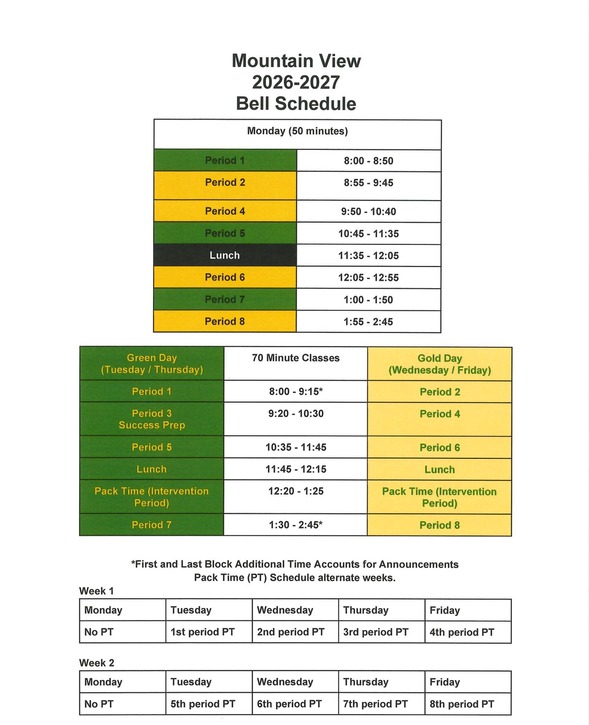
Our school hours are 8am-2:45pm. Students will not be able to enter the building until 7:45am.
 |
-
Senate Bill 108 is a new Virginia law that went into effect on July 1. It requires that all schools in the state follow a “bell-to-bell” phone-free policy and prohibit cellphone possession and use for the entire school day. The updated FCPS Cellphone Policy aligns with this law, which means high school students are no longer able to use cellphones, cellphone accessories, or smart devices (like smart glasses, earbuds, headsets, and other items connected to the phone) during lunchtime.
- Across all grade levels, cellphones, cellphone accessories, and all smart devices must be off and personally stored for the duration of the school day. Watches that serve a dual purpose (like a smartwatch) must be off and personally stored for the duration of the school day, too. Personal devices that connect to a cellphone or cellphone accessory or operate as a smart device must also follow the FCPS Cellphone Policy.
- This policy does not apply to school-issued devices. However, school-issued devices must be used in accordance with FCPS Regulation 6410, Acceptable Use Policy, which allows the use of school-issued devices for educational purposes. More details are available on the FCPS Cellphone Policy webpage.
The first day of school, Monday, August 24, is just around the corner! Check out these back-to-school tips to make sure your child gets off to a great start.
Also find out what will be new this school year.
Starting this school year, students may only use FCPS-issued devices for school-related digital activities during the instructional day. This is in accordance with a new School Board requirement, approved on July 16, which states that students may not use personal electronic communication or computing devices, including personal laptops, tablets, smartwatches, smartphones, and similar devices.
Students may only use a personal device if it is required as part of a necessary accommodation in the students’ Individualized Education Program (IEP) or Section 504 Plan. A principal or the principal’s designee may approve a limited, course-specific exception for students enrolled in a specialized class when the curriculum requires a technology tool or software that isn’t available on a standard FCPS-issued device.
Families can help support this requirement by reminding students to bring their FCPS-issued device each day and use it for all school-related digital activities unless an approved exception applies.
New Student ID Cards and Bus Navigation System
FCPS is launching a new bus navigation system, which includes student ID cards for students who ride the bus. Students will use the cards to tap on and off the bus, helping FCPS and families know exactly which students are riding which buses.
Learn more about the new system and how it will improve route efficiency, safety, and transparency with families. Check out the frequently asked questions for families.
A new Schoology Study and Support Hub is available for students in Schoology. This space was developed by the FCPS Educational Technology Team with input from students. It is designed to provide essential study tools and academic support resources directly to our learners.
Students can log in to Schoology and read their Schoology announcements or watch this video on the support hub for more information.
Explore School Meals in the New Menu Platform
Experience an easier way to view your child’s school menus using MealViewer:
- View what is being served each day.
- View the nutritional information for each meal.
- See if any specific allergens are being served.
- Get notified when your student’s favorite meal is being served.
Printable menus are always available on the Food and Nutrition Services webpage.
The FCPS Family Academy is where families can learn and get support for their child’s school journey.
We know that parents and caregivers are critically important in their child’s education. The Family Academy lists classes, webinars, workshops, and programs offered by FCPS to help you support your child's needs and learning at home. The Family Academy also includes information about resources available to help every family ensure their child has what they need to succeed.
Visit the Family Academy webpage. Check out its catalog for upcoming classes, workshops, and webinars to help families learn about FCPS, parenting, early literacy, and how to partner with schools.
Is WhatsApp one of the ways you stay connected with family, friends, and your community? Now you can use it to stay connected with FCPS, too.
Follow the new FCPS WhatsApp Channel for helpful information and reminders throughout the school year, including important announcements, upcoming dates, tips for families, and more.
There are a lot of school and FCPS webpages to bookmark, but the FCPS mobile app serves as your central hub!
Check daily meal menus and calendars with no login required, or use one-tap quick links to launch SIS ParentVUE, Schoology, and MySchoolBucks.
Download the FCPS mobile app from the Apple App Store or Google Play Store.
In case you missed it FCPS This Week.
If you are not already receiving the weekly newsletter, please sign up today.
|