In the previous email I introduced some of the main challenges with AI and my perspectives.
I believe AI and agents can really boost productivity and make you a better developer (not just generating code but actually helping improve your understanding). But if you use it like a rookie you're going to get bad results. That's what this email is about. How can we get high quality output from AI?
Today lets learn the actual tools you need to know. I'm not going to talk about all the options, I'm just going to tell you exactly what to do.
First, start with a Goal
Before we go in to learning the tools, let's start with a goal.
As practice, I would challenge you to build out a workflow or small app ENTIRELY with AI. Give yourself a day or two, nothing crazy from the get-go. Our goal is to just get some practice with AI and learn the ins-and-outs. While this may not be what you do in practice, by forcing yourself to do this you'll gain the most experience with AI development.
Which AI Platform to Go With?
I recommend to start off getting really good with one platform. Instead of splitting focus across Cursor, Claude Code, Antigravity, Codex, etc, pick just one! Just like with languages, it doesn't matter what you pick. If you're not sure I'd recommend Claude Code.
No BS Getting Started Guide
Go right to the IDE or terminal, don't use the AI GUI apps (like Claude Desktop or ChatGPT desktop, even if they have a section for development).
Start with a repo. Create a new directory, open claude, run /init.
Create a markdown file for instructions. CLAUDE.md.
Create a directory called /vault. Download obsidian and open this folder as a new vault. This vault is going to be the HQ for your AI.
Put in your claude md file that you want to run your AI from the vault and that you expect it to update the vault as we go.
Vault is where you put anything like documentation, specs, notes, etc.
Depending on your work you can split the vault in to different sections. If you're building an app you can have auth, security, design, quality-control etc.
By scoping your instructions you don't overload Claude with a million things to remember at any moment in time.
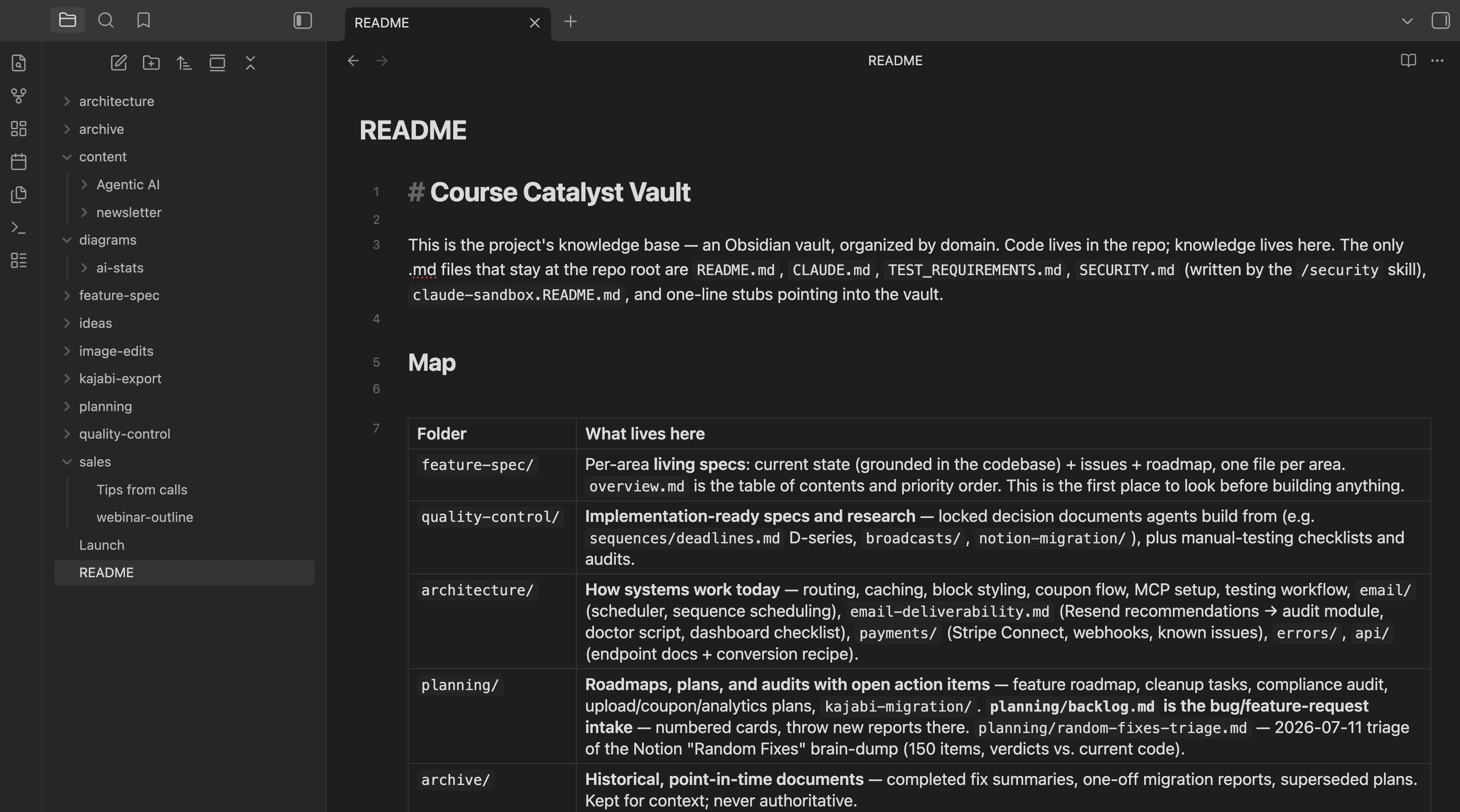 AI does have the ability to store memories across sessions, but that behavior is too opaque for me. I prefer to have insight in to the entire thinking-framework of the AI and have it keep itself up to date so it doesn't introduce old patterns or behaviors.
Initialize Your Project
You can ask your AI to help, or what I would consider is just find the simplest initialization steps from documentation online. This step is going to be a lot different depending on what you're building.
Model Choice
Usually the default will work because Claude will pick the best model for the type of work. But you can use /model to get an idea of what models exist and what to use them for. I like to use the more expensive models for direction and specs, and cheaper models for implementation.
Creating your first skill
This sounds crazy, but when you're starting, don't learn how to configure anything or do anything yourself. Just tell Claude to do it.
Create a skill /spec which is designed to define the features of a section
Don't just tell your AI to create the skill.
Ask your AI what the skill should do.
Based on my framework of choice, brainstorm the best simple structure for getting features built, make these a very simple bullet list within /spec. If you have any that require my input let me know.

Add to the spec the requirement for you to prompt me with any design choices we could frontload. As much as possible we want to reduce uncertainties and the spec.

Build a section in /spec on testing

Place the spec in /specs in our vault with clear check marks. 2 per spec line, implemented and verified
...etc.
The idea is to use the tool (Claude) that helps the tool perform better.
To invoke this you'll just say /spec auth
Subagents
Sub agents are actually similar to skills. The main difference is how context is managed. With a subagent the context stays OUTSIDE of our main window, which allows us to keep our main chat clean. Skills bring all info and execution in to the main window.
When do we want to use a subagent? If we have a specific isolated task.
We could append to our /spec skill with a prompt:
add to /spec to delegate a research sub agent if needed to research pros and cons of various implementation approaches. Have it report these findings back to us as a clear table ALSO considering any of our current app infrastructure.
Claude will launch a general purpose agent.
You can also ask Claude to define an explicit agent if needed and refer to that from the skill. So we could have a research agent with all the instructions baked in.
Workflows and Orchestration
You can define multi-step processes within your vault or skills to do more complex things.
I recommend utilizing sub agents as it will allow the higher level agent to focus on the bigger task. When done properly, you'll rarely get responses like "We still need to implement X, should we continue?" which is hella annoying and kills any potential for autonomous work.
You can spend a lot of time building out workflows, and if you're not careful, you can over-engineer the process and introduce a lot of bureaucracy and token wastage. In general I like to keep things thin, but If I want to build a big feature without baby sitting, I use a dedicated /launch skill which defines a more intense workflow.
Again, I wouldn't use this for everything, but this lets me get big features started even on the go (through remote-control).
/launch — brief summary

An autonomous build system where you (the AI) are the Lead: the human's single point of contact. You don't write code — you talk, plan, launch bundles, and decide.

Three levels: HUMAN → LEAD → BUNDLES (parallel) → WORKERS
- Lead (smartest model) — plans specs, launches bundles, filters decisions.
- Bundle (background) — owns one feature/bug end-to-end.
- Workers — Test Writer, Implementer, UI, Verifier + a read-only linter gate.

Quality via a gate stack (in series): spec → Test Writer → Implementer/UI → Linter → Verifier. Splits run in parallel, then a final Verifier sweep catches cross-cutting issues.

Decision filter — one question: "If this is wrong, is it cheap to undo?" Cheap (~95%) → the bundle just decides. Expensive → bubbles to the Lead. Truly irreversible (money, auth, data model) → only these reach the human.

Core principles: never idle (do all other work before bubbling up), agents stay resumable until the human confirms done, build the simplest thing that works, and record decisions/invariants in files not chat.
Hooks
Hooks allow us to tie to the steps of the prompt-response lifecycle to add in additional checks or expectations. We'll explore these more tomorrow when we talk about enforcing high quality output.
In my case I use hooks to prevent dangerous commands as well as enforce outputs that meet certain requirements.
What next?
We've learned some of the fundamentals here, but having a bunch of tools doesn't help you produce quality results.
It's a great start. you should just try it, have some fun with it.
I think so many devs have lost their desire to learn and explore. Who cares what you build or if it has an immediate ROI (it does, but you get the idea).
Once you get familiar with the tools its a lot easier to start enforcing quality. I'll talk about some of the strategies in tomorrows lesson.
The things we've talked about in these lessons just SCRATCH THE SURFACE of what is possible. For those of you who want to take it more seriously, I have an Agentic AI course (and mentorship or 1:1 call options) that are available for just a limited time. Either way I will continue to send these lessons in email form, but that program is going to help you implement what we've learned in your life, work, or business.
If you'd be interested in hearing more, reply with "agentic" and I'll share more info.
Until tomorrow,
Caleb
Unsubscribe from marketing emails
Sent via Course Catalyst on behalf of CodeBreakthrough
500 Westover Dr #217334
Sanford, NC 27330
© CodeBreakthrough. All rights reserved.