
|
Kubernetes Explained: The Control Plane Behind Modern Applications
Containers made applications portable. Kubernetes made them operable at scale.
|

| |||||||||||||||


Let MyClaw Do the Follow-Up (Sponsor)
 |
One of the nicest things about AI is when you don’t have to remember to ask. MyClaw lets you run OpenClaw in the cloud, schedule recurring tasks, and receive updates in Telegram or WhatsApp automatically.
Whether you’re keeping up with AI news, tracking a project, or researching a topic over time, it’s a simple way to turn OpenClaw into something that keeps working after you’ve logged off.
Containers solved a huge software delivery problem.
Before containers, teams had to worry about whether an application would behave the same way across a developer’s laptop, a staging server, and production. Docker changed that by letting teams package an application with its dependencies, runtime, libraries, and configuration into a portable unit.
But containers created a second problem.
Running one container is easy. Running ten is manageable. Running hundreds or thousands across different services, servers, environments, and cloud regions is where things start to break down.
You now have to answer harder questions.
Where should each container run? What happens when one crashes? How do services find each other when container IPs keep changing? How do you roll out a new version without downtime? How do you scale during traffic spikes? How do you keep teams from stepping on each other’s workloads?
This is the problem Kubernetes was built to solve.
Kubernetes, often called K8s, is an open-source container orchestration platform that automates the deployment, scaling, networking, and management of containerized applications. Instead of manually managing every container, engineers describe the desired state of an application, and Kubernetes continuously works to make the real system match that state.
That is the big mental model.
Kubernetes is a place to run containers likewise a control system for applications.
The Core Idea
The simplest way to understand Kubernetes is this:
You tell Kubernetes what you want the application to look like, and Kubernetes figures out how to keep it that way.
For example, you might say: “Run three replicas of this web service, expose it internally, give it this configuration, and restart it if it fails.”
Kubernetes stores that desired state. Then it continuously watches the actual state of the cluster. If one replica crashes, Kubernetes starts another. If a node fails, Kubernetes can move workloads elsewhere. If traffic increases, Kubernetes can help scale the application.
This is what makes Kubernetes different from manually starting containers.
A manual command runs once. Kubernetes keeps reconciling.
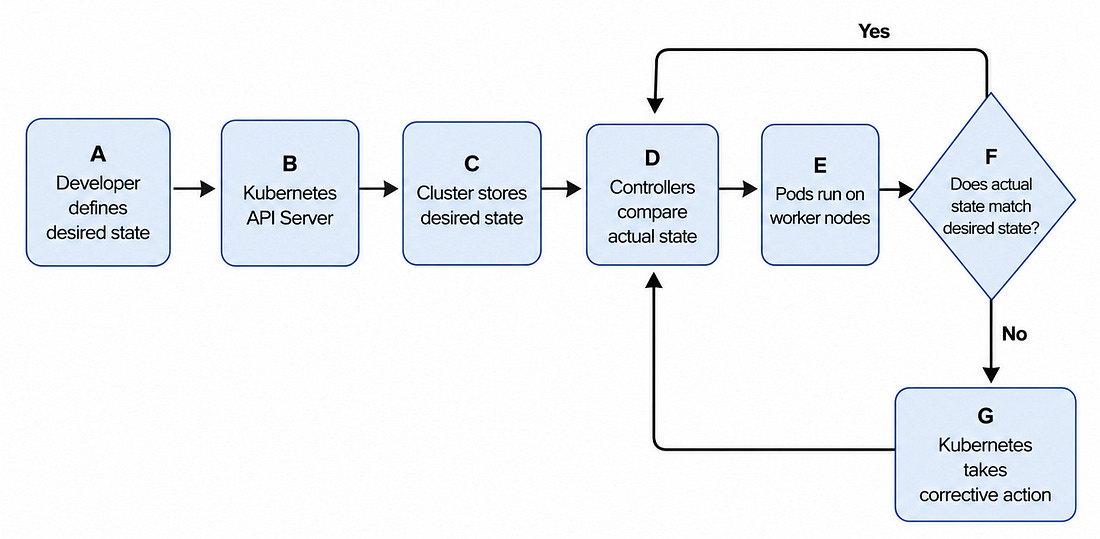 |
This reconciliation loop is why Kubernetes is powerful. It gives engineering teams a way to operate distributed systems without manually chasing every failed container, changing IP address, or scaling event.
Why Kubernetes Became Necessary
Containers are temporary by design. They can start, stop, crash, move, or be replaced. That is fine when you are testing locally, but it becomes a real operational challenge in production.
A modern application is rarely one service. It may include a frontend, several backend APIs, authentication, billing, search, background workers, queues, monitoring agents, and internal tools. Each service may need multiple replicas. Each replica may run on a different machine. Each one may have different resource needs.
Without orchestration, teams end up with container sprawl.
The problem is not just the number of containers. It is the fact that everything is constantly changing. Traffic changes. Nodes fail. Deployments happen. Containers restart. New versions roll out. Services need to communicate even when the underlying infrastructure is moving.
Kubernetes gives teams a standard way to manage that movement.
It handles placement, recovery, service discovery, scaling, and lifecycle management. Developers define the application. Kubernetes handles much of the operational work required to keep it running.
That is why Kubernetes became the default foundation for many cloud-native platforms.
How Developers See Kubernetes
From a developer’s perspective, Kubernetes usually starts with a YAML file.
The developer writes a manifest that describes the application. This file may include the container image, number of replicas, ports, environment variables, resource requirements, and configuration.
Then the developer applies it:
kubectl apply -f app.yamlAfter that, Kubernetes takes over.
It validates the request, stores the desired state, schedules the workload onto a node, starts the container, monitors its health, and keeps checking whether the running system still matches what the developer requested.
The developer does not need to manually SSH into servers, choose where the container should run, or restart it after a crash.
The YAML becomes the contract. Kubernetes becomes the operator.
The Kubernetes Architecture
A Kubernetes cluster has two major parts: the control plane and the worker nodes.