
|



WorkOS launches auth.md - an open protocol for agent registration (Sponsored)
 |
Sign-up forms were built for humans in browsers, so how do AI agents programmatically register with services?
Enter auth.md. By exposing a single, machine-readable Markdown file at your service root, AI agents can dynamically discover your OAuth Protected Resource Metadata, parse required scopes, and authenticate seamlessly.
With native support in WorkOS AuthKit, you can now implement this protocol out of the box, giving AI tools a standardized, secure way to log into your application.
Airtable holds embeddings for hundreds of thousands of customer databases, and on any given week, roughly three-quarters of them sit completely idle. This fact, more than any algorithm or vendor choice, decided the architecture behind their semantic search system. The interesting story is not which vector database they picked. It is how one peculiar property of their data forced a specific chain of engineering decisions, each one logical only in light of the one before it.
Airtable is a platform where customers build their own database-like applications, organized into “bases” that often hold hundreds of thousands of rows. Their AI feature, called Omni, lets users ask natural-language questions of their data and get answers back in plain English. A separate feature, linked record recommendations, suggests relationships between rows based on meaning rather than exact text matches. Both features depend on the same underlying capability, which is finding the rows in a base that are semantically relevant to a user’s intent.
This might sound simple until scale enters the picture. When a base has half a million rows, fitting all of them into a single LLM prompt becomes infeasible. The model has limits on how much context it can absorb, and even if those limits did not exist, sending that much data on every query would be slow and expensive. The system has to find the most relevant rows fast, then hand those rows to the LLM as context.
In this article, we will look at how Airtable’s data infrastructure team built its architecture, the challenges they faced, the tradeoffs they accepted, and why the choices they made only make sense once their data is properly understood.
Disclaimer: This post is based on publicly shared details from the Airtable Engineering Team. Please comment if you notice any inaccuracies.
The Data and the Constraints
The Airtable team anchored their work around four design priorities:
Queries had to return within 500 milliseconds at the 99th percentile, which means the slowest 1 percent of queries still had to come back within that window. Anything slower would make the AI features feel sluggish.
Writes had to be high-throughput since customer data changes constantly, and embeddings have to keep pace.
The system had to scale horizontally to support millions of independent bases.
Everything had to be self-hosted because customer data privacy required keeping it all inside Airtable-controlled infrastructure.
Beyond those priorities, Airtable’s data has three properties worth flagging early:
Customer bases vary enormously in size, with some holding a handful of rows and others holding hundreds of thousands.
Each base is isolated, meaning one customer’s data must never leak into another customer’s results.
Most bases are idle most of the time, a fact that becomes important in a later section.
Before going further, we need to understand what an embedding is.
An embedding is a list of numbers, typically several hundred or a thousand of them, generated by a neural network. The network is trained so that two pieces of text with similar meanings produce numerically close vectors. An embedding can be thought of as a fingerprint of meaning, where similarity in the numbers reflects similarity in what the text says.
One important practical fact is that embeddings are typically about ten times the size of the original data they represent, which is why Airtable cannot just store them alongside the source rows in their primary database. A separate system is needed, one designed specifically for storing and searching across these large numerical vectors.
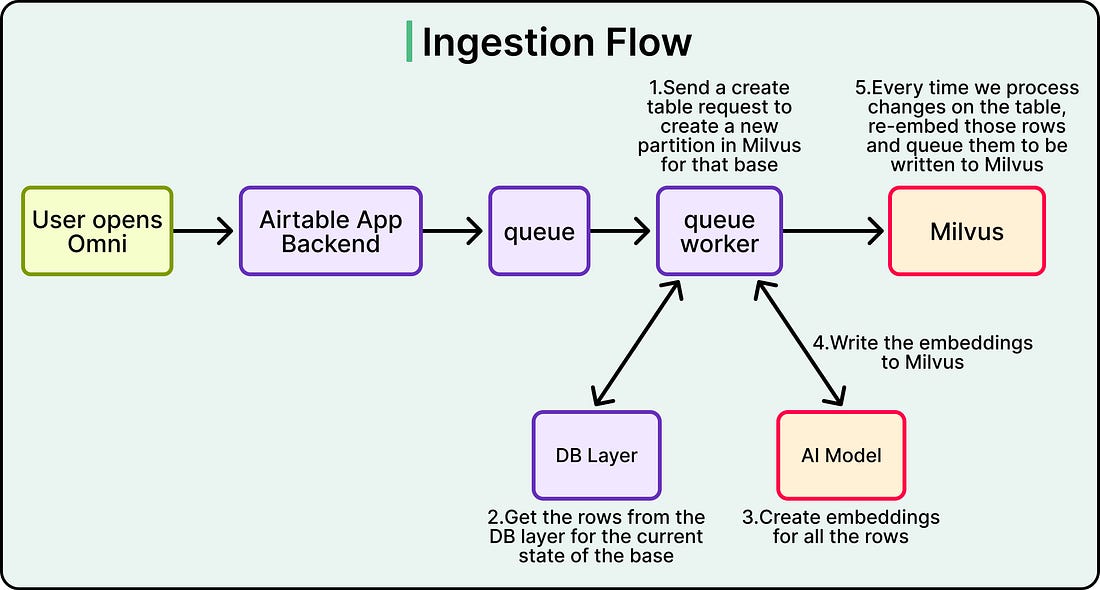
The asynchronous embedding pipeline that generates and updates these vectors as customer data changes is a separate system, which is the database that stores the embeddings and serves queries against them. After evaluating the landscape in late 2024, Airtable selected Milvus as its database. This is because Milvus supported self-hosting, handled multi-tenancy through its partition model, and let them scale ingestion, indexing, and query execution as separate components. Picking Milvus, though, was the easy part. The hard part was figuring out how to organize Airtable’s data inside it.
See the diagram below:
 |
Partitioning Strategy
The first real architectural question was how to slice up customer data so that millions of bases can coexist in one system without leaking into each other.
Two options were on the table.
The first option of shared partitions would put many bases together in the same physical slice and rely on a customer ID filter at query time to keep results separate. This approach uses resources efficiently because there is no partition for every customer, and small bases do not sit around taking up dedicated storage. The cost is that every query carries the overhead of filtering by customer ID, and deleting a customer’s data becomes complicated because the rows are scattered across shared partitions.
The second option of having one partition per base gives each customer their own physical slice. Queries are naturally isolated because they only ever touch one partition. Deletion is trivial since dropping the partition is enough. The cost is operational. With millions of customers, the database ends up managing millions of partitions, which puts pressure on its internal bookkeeping.
Airtable picked the second option. The reasoning was that strong physical isolation made permission boundaries obvious, deletion stayed simple, and queries avoided the latency cost of post-query filtering.
Then the team ran into a problem.
At around 100,000 partitions inside a single Milvus collection, performance fell off a cliff. Partition creation latency went